---
title: I am getting an 2502 or 2503 error when installing the Shopgenie Importer.
description: You may encounter 2502 or 2503 errors while installing the Shopgenie. The root cause of these errors is the MSI installation service on Windows. Whenever you install or uninstall a program, files have to be written to a temporary folder.
---
[Skip to content](https://support.shopgenie.io/support/i-am-getting-an-2502-or-2503-error-when-installing#main-content)
English
Show submenu for translations
![SG\_Mark\_White-Oct-09-2023-04-04-04-8207-PM.png\]](https://support.shopgenie.io/hs-fs/hubfs/SG_Mark_White-Oct-09-2023-04-04-04-8207-PM.png?height=40&name=SG_Mark_White-Oct-09-2023-04-04-04-8207-PM.png)
Open main navigation
Close main navigation
- English
Show submenu for translations
- Go to shopgenie.io
Go to shopgenie.io
Shopgenie Support Articles
- There are no suggestions because the search field is empty.
1. [Shopgenie Support](https://support.shopgenie.io/support?hsLang=en)
2. [Troubleshooting](https://support.shopgenie.io/support/troubleshooting?hsLang=en)
# I am getting an 2502 or 2503 error when installing the Shopgenie Importer.
## You may encounter 2502 or 2503 errors while installing the Shopgenie. The root cause of these errors is the MSI installation service on Windows. Whenever you install or uninstall a program, files have to be written to a temporary folder.
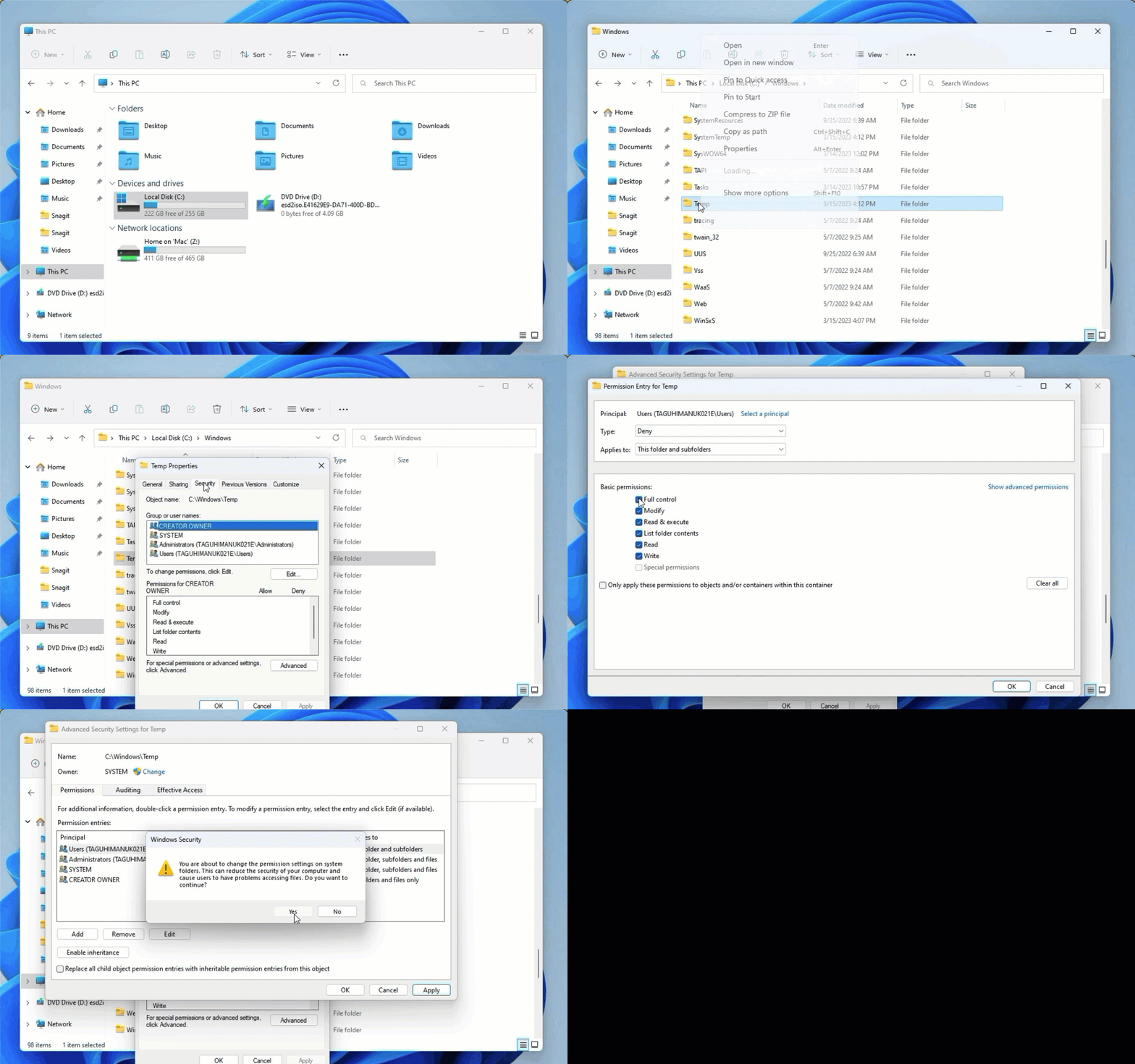
1. Go to **Local Disc (C:)** and open the **Windows** folder.
2. Find the **Temp** folder and right-click on it.
3. Go to **Properties** \>\>\> **Security tab** \>\>\> **Advanced**.
4. Click on your Windows user and change the permission to **Full control**.
5. Click **Apply**.
6. If you receive warning messages, click **Yes** and continue.
7. Download and Install the (Shopgenie) Importer again from [here](https://support.shopgenie.io/hubfs/Shopgenie%20Importer.zip?hsLang=en).
After completing all the steps, the issue should be fixed. If not, contact the Shopgenie support team for further assistance.
- [Getting Started](https://support.shopgenie.io/support/getting-started?hsLang=en)
- [General](https://support.shopgenie.io/support/general?hsLang=en#main-content)
- [Tekmetric Marketing](https://support.shopgenie.io/support/general?hsLang=en#tekmetric-marketing)
- [FAQs](https://support.shopgenie.io/support/faqs?hsLang=en)
- [Settings](https://support.shopgenie.io/support/settings?hsLang=en)
- [Troubleshooting](https://support.shopgenie.io/support/troubleshooting?hsLang=en)
- [Campaigns](https://support.shopgenie.io/support/campaigns?hsLang=en#main-content)
- [FAQ](https://support.shopgenie.io/support/campaigns?hsLang=en#faq)
- [Integrations](https://support.shopgenie.io/support/integrations?hsLang=en)
- [Reviews](https://support.shopgenie.io/support/reviews?hsLang=en)
- [Shopgenie Website](https://support.shopgenie.io/support/shopgenie-website?hsLang=en)
- [Online Booking](https://support.shopgenie.io/support/online-booking?hsLang=en)
- [Calendar](https://support.shopgenie.io/support/calendar?hsLang=en)
- [Phones](https://support.shopgenie.io/support/phones?hsLang=en)
[](http://shopgenie.io)
[mailto:email@email.com](mailto:email@email.com)
Copyright © 2026, Tekmetric