![SG_Mark_White-Oct-09-2023-04-04-04-8207-PM.png]](https://support.shopgenie.io/hs-fs/hubfs/SG_Mark_White-Oct-09-2023-04-04-04-8207-PM.png?height=40&name=SG_Mark_White-Oct-09-2023-04-04-04-8207-PM.png)
Whether you'd like to run a special promotion or a quick announcement, the Shopgenie team has you covered! 🎉
Step 1: Navigate to the blast campaign tab
In the campaigns area you'll see a tab named campaigns. This is where scheduled and sent campaign blasts live.
Step 2: Request a blast campaign
Click on the "new blast" button and fill out the campaign request form.
If you're running a special promotion please give us 1-2 weeks notice and we'll help you design, write and schedule the blast when you need it.
If you need a quick announcement, ex. "slow day blast" we can usually put a rush order in and help you get it drafted, scheduled and sent.
Moral of the story, our team will find a way to take care of you. 🔧
Step 3: Sit tight! We'll be in touch! 🎉
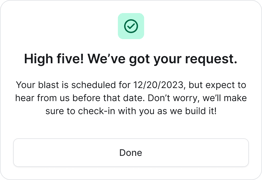
After submitting the form, you should see a confirmation like the one below. Our team will begin working on your blast and keep you in the loop.